Closed Loop Modality
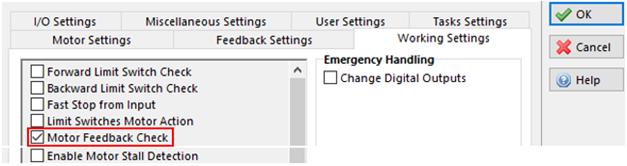
Closed Loop Modality is working if the bit Drive_Working_Settings.Motor Feedback_Check = 1.
In this modality, the stepper motor works using control loops and the drive supply only the current required at the motor shaft. The motor can be controlled in position, velocity, and torque loops.
For this modality it’s necessary to use a stepper motor with incremental encoder feedback installed on the rear shaft. It is also necessary to set other parameters, such as the encoder resolution and tuning of the GAIN objects that are dependent on shaft loading.
-
- In Closed Loop Modality, the Motor Feedback Check (enables Closed Loop modality) feature and Enable Motor Stall Detection(enables Open Loop Stall Detect) feature cannot both be active at the same time.
If you try to enable the Motor Feedback Check feature with the Enable Motor Stall Detection feature already enabled, or vice versa, the system will issue an Feedback_Error alarm (bit 5 of Error_Register object and bit 14 of Feedback_Status object are set to 1).
See Motor Stall Detection for more details about the Enable Motor Stall Detection feature.
Below is the list of Objects necessary for the configuration of the drive to work in Closed Loop.
|
Object name |
Note |
|---|---|
|
Mandatory |
|
|
Mandatory |
|
|
Should be set to nominal Motor Winding Current according to the catalog specification to keep the motor energized with full torque when the closed loop is disabled. For example, at power up or when the Feedback Error Alarm occurs. |
|
|
Mandatory |
|
|
Mandatory |
|
|
Mandatory |
|
|
Mandatory |
|
|
Typically set to the motor catalog data for Resistance (Motor_R) and Inductance (Motor_L). If Resistance is in Ohms and Inductance is in mH, then be sure to multiply by 1000 when entering values into this parameter. Alternatively and more simply, the values can be omitted if Motor RL Detection is enabled in the Working Setting tab in the Global Parameters window. (bit Drive_Working_Settings.Motor_RL_Detection =1). |
|
|
Optional, typically set to 0. Defines a delayed start based on a set amount of time. If set to 50,000, the delay is 50,000 micro-seconds. The motor will start after a 0.5 seconds delay. |
|
|
Optional, typically set to 0. Defines a delayed start based on input pulses. Ex. If set to 5, the motor will start on the 6th pulse input. |
|
|
This Object allows the user to set some working features and enable Closed Loop Modality by checking the Motor Feedback Check feature. |
|
|
This Object allows the user to set some working features. |
The following objects can be found in the Feedback Settings tab in the Global Parameters window.
| Object Name | Note |
|---|---|
|
Mandatory |
|
|
Mandatory |
|
|
Mandatory. Generally a default value of 5 rpm works well |
|
|
Mandatory |
|
|
Mandatory. Default value is set to 3000 rpm |
|
|
Must be defined in Mode 0,1 and 2 |
|
|
Mandatory |
|
|
Mandatory. GAIN to tuning depending by application |
|
|
Mandatory. GAIN to tuning depending by application |
|
|
Mandatory. GAIN to tuning depending by application |
|
|
Mandatory. In the first test, this can be left equal to 0 |
|
|
Mandatory. In the first test, this can be left equal to 0 |
|
|
Mandatory. In the first test, this can be left equal to 0 |
|
|
Mandatory. In the first test, this can be left equal to 0 |
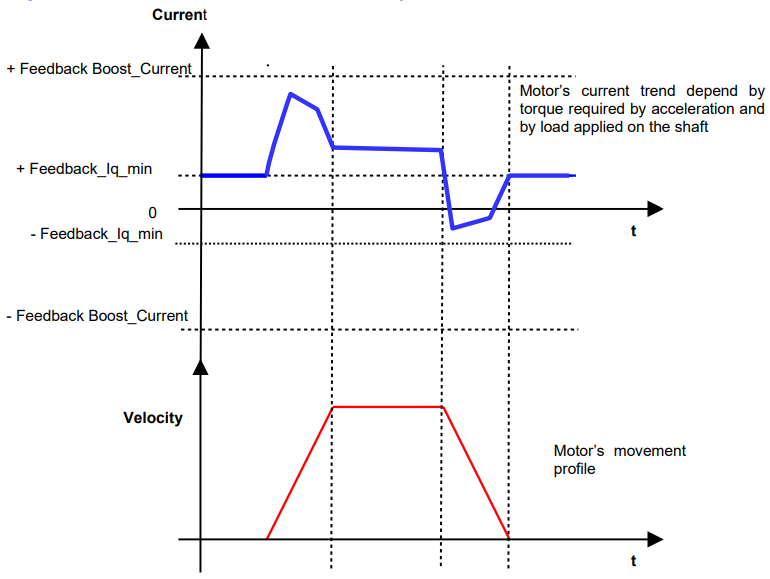
Diagram of the motor’s current reference in close loop